 socmedb.com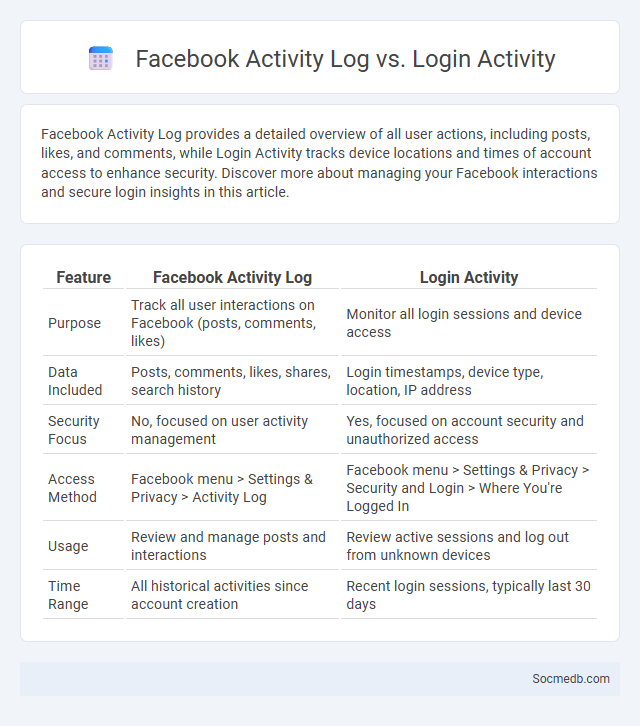
Photo illustration: Facebook Activity Log vs Login Activity
Facebook Activity Log provides a detailed overview of all user actions, including posts, likes, and comments, while Login Activity tracks device locations and times of account access to enhance security. Discover more about managing your Facebook interactions and secure login insights in this article.
Table of Comparison
| Feature | Facebook Activity Log | Login Activity |
|---|---|---|
| Purpose | Track all user interactions on Facebook (posts, comments, likes) | Monitor all login sessions and device access |
| Data Included | Posts, comments, likes, shares, search history | Login timestamps, device type, location, IP address |
| Security Focus | No, focused on user activity management | Yes, focused on account security and unauthorized access |
| Access Method | Facebook menu > Settings & Privacy > Activity Log | Facebook menu > Settings & Privacy > Security and Login > Where You're Logged In |
| Usage | Review and manage posts and interactions | Review active sessions and log out from unknown devices |
| Time Range | All historical activities since account creation | Recent login sessions, typically last 30 days |
Overview of Facebook Activity Log
Facebook Activity Log provides a detailed record of your interactions, including posts, comments, likes, and shares, organized by date and type. It allows you to review, manage, and control your digital footprint by adjusting privacy settings or deleting specific activities. You can efficiently monitor your online presence to enhance security and customize your social media experience.
Understanding Facebook Login Activity
Understanding Facebook login activity helps you monitor account security by tracking device types, locations, and timestamps of access. Alerts for unrecognized logins enable quick responses to potential breaches, safeguarding personal information. Regularly reviewing this data ensures your social media presence remains secure and under your control.
What Is Facebook Activity Log?
Facebook Activity Log is a comprehensive record of your interactions on the platform, including posts you've liked, comments you've made, and content you've shared. It allows you to review and manage your activities, ensuring privacy control and content visibility according to your preferences. By accessing your Facebook Activity Log, you gain full oversight of your digital footprint and can easily edit or delete past actions.
Key Differences Between Activity Log and Login Activity
Activity Log tracks your interactions on social media platforms, such as likes, comments, and posts, allowing you to review and manage your content history. Login Activity records details about your account access, including device type, location, and timestamps, which helps you monitor unauthorized logins and secure your account. Understanding these key differences empowers you to maintain both your social presence and account security effectively.
How to Access Facebook Activity Log
To access your Facebook Activity Log, open the Facebook app or website and go to your profile page. Click on the three-dot menu next to the "Add to Story" button, then select "Activity Log" from the dropdown options. Your Activity Log will display all your interactions, including posts, comments, and likes, allowing you to review and manage your activity on the platform efficiently.
How to View Your Login Activity on Facebook
To view your login activity on Facebook, navigate to the "Settings & Privacy" section, then select "Settings" and click on "Security and Login." Under the "Where You're Logged In" tab, you can see all active sessions along with device types, locations, and login times. Reviewing this information helps identify unauthorized access and enhances account security.
Information Tracked by Activity Log vs. Login Activity
Social media platforms track a wide range of user information through activity logs, including posts, likes, comments, search history, and interactions with content to personalize user experience and targeted advertising. Login activity records data such as device type, IP address, timestamp, and geographic location to monitor unauthorized access and enhance security measures. Understanding the distinction between these logs helps users manage privacy settings and control the information shared with social media services.
Privacy Implications: Activity Log vs. Login Activity
Social media platforms collect extensive data through activity logs, capturing user interactions such as posts, likes, and comments, which provides detailed insights into personal behavior but raises privacy concerns due to potential misuse. Login activity records the times, locations, and devices used to access accounts, highlighting security risks like unauthorized access and identity theft. Understanding the differences between activity logs and login activity is crucial for users seeking to manage their privacy settings and protect sensitive information effectively.
Managing Your Facebook Activity Log
Managing your Facebook activity log allows you to review, edit, or delete posts, comments, and likes, ensuring your online presence reflects your desired image. Regularly monitoring this log helps protect your privacy by controlling what content is visible to friends or the public. You can customize filters within the activity log to quickly find specific actions, making it easier to maintain a clean and intentional Facebook timeline.
Tips for Securing Your Facebook Account Activities
Strengthen your Facebook account security by enabling two-factor authentication and regularly updating your password with a unique combination of letters, numbers, and symbols. Review your active sessions and log out from unfamiliar devices to prevent unauthorized access. You should also adjust your privacy settings to control who can see your posts and personal information, reducing the risk of identity theft and cyberattacks.