 socmedb.com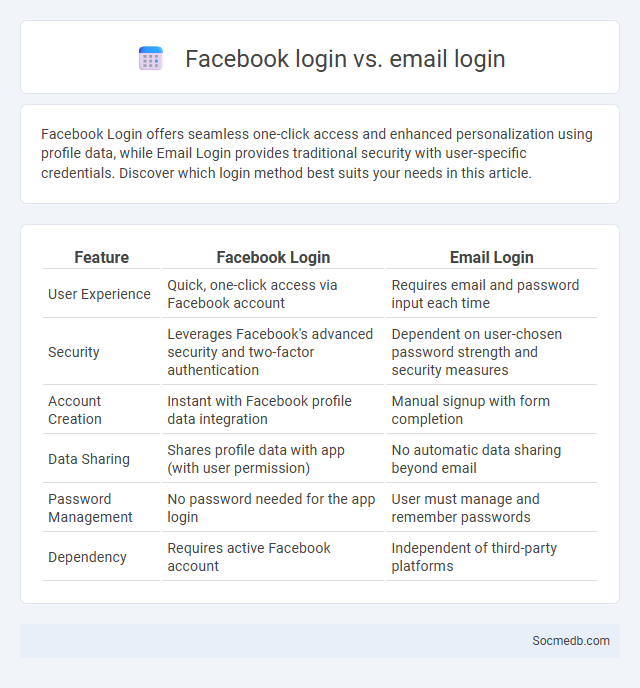
Photo illustration: Facebook Login vs Email Login
Facebook Login offers seamless one-click access and enhanced personalization using profile data, while Email Login provides traditional security with user-specific credentials. Discover which login method best suits your needs in this article.
Table of Comparison
| Feature | Facebook Login | Email Login |
|---|---|---|
| User Experience | Quick, one-click access via Facebook account | Requires email and password input each time |
| Security | Leverages Facebook's advanced security and two-factor authentication | Dependent on user-chosen password strength and security measures |
| Account Creation | Instant with Facebook profile data integration | Manual signup with form completion |
| Data Sharing | Shares profile data with app (with user permission) | No automatic data sharing beyond email |
| Password Management | No password needed for the app login | User must manage and remember passwords |
| Dependency | Requires active Facebook account | Independent of third-party platforms |
Introduction to Login Methods
Social media platforms offer various login methods including traditional email and password, social media account integration, and biometric authentication like fingerprint or facial recognition. These methods enhance security, streamline access, and personalize your user experience. Choosing the right login option helps protect your account while making it easier for you to connect with friends and content.
Overview of Facebook Login
Facebook Login provides a streamlined authentication system allowing users to access third-party apps and websites using their Facebook credentials. This integration enhances user experience by reducing the need to create multiple accounts while enabling developers to access profile data such as email and public information securely. Your seamless login process helps personalize services and facilitates social sharing within connected platforms.
Understanding Email Login
Understanding email login is essential for securing your social media accounts and maintaining privacy across platforms. Your email credentials often serve as the primary method for account recovery and password resets, making it crucial to use strong, unique passwords and enable two-factor authentication. Regular monitoring of login activity helps you detect unauthorized access and protect your online identity effectively.
What Is Third-Party App Login?
Third-party app login allows users to access a social media platform or app using credentials from another service, such as Google, Facebook, or Twitter, streamlining the authentication process. This method enhances user convenience and security by eliminating the need to create and remember multiple passwords, while often leveraging OAuth protocols for secure data exchange. Businesses benefit from increased user engagement and simplified account management through seamless integration with popular social media authentication systems.
Security Comparison: Facebook vs Email vs Third-Party
Facebook employs advanced encryption protocols and multi-factor authentication to protect user data, but its centralized nature makes it a target for large-scale breaches. Email security varies widely depending on the service provider, with options like end-to-end encryption available through platforms such as ProtonMail, while traditional email remains vulnerable to phishing and malware attacks. Third-party social media apps often lack rigorous security measures, increasing risks of unauthorized data access and privacy violations due to weaker oversight and inconsistent encryption standards.
User Experience and Convenience
Social media platforms prioritize user experience by offering intuitive interfaces and personalized content feeds that enhance engagement and satisfaction. Features such as seamless navigation, quick loading times, and integrated multimedia support contribute to overall convenience, allowing users to interact effortlessly across devices. Advanced algorithms tailor content to individual preferences, ensuring relevant and timely updates that keep users connected and informed.
Privacy Implications
Social media platforms collect vast amounts of personal data, raising significant privacy concerns for users worldwide. Data breaches and unauthorized third-party access often result in sensitive information being exposed, highlighting the need for robust security measures. Users must understand privacy settings and regulations like GDPR to protect their digital identities effectively.
Integration and Compatibility
Social media platforms offer extensive integration and compatibility features that boost your online presence and streamline content sharing across multiple channels. APIs and plugins enable seamless connection with websites, e-commerce platforms, and third-party applications, enhancing user engagement and data synchronization. Optimizing these integrations ensures consistent branding and maximizes the reach of your marketing efforts.
Use Cases in Different Industries
Social media platforms drive brand awareness and customer engagement in industries such as retail, where targeted advertising boosts sales and loyalty. In healthcare, social media enables patient education, telemedicine promotion, and real-time crisis communication. Financial services leverage social media for fraud detection, customer support, and personalized marketing campaigns, enhancing overall operational efficiency.
Choosing the Right Login Method
Choosing the right login method for social media platforms significantly enhances your account security and user experience. Utilizing options like OAuth, two-factor authentication, or biometrics reduces the risk of unauthorized access while simplifying the sign-in process. Ensuring Your preferred login method aligns with both convenience and protection builds a safer digital presence.